The Two-Hour Detection, the Six-Week Silence
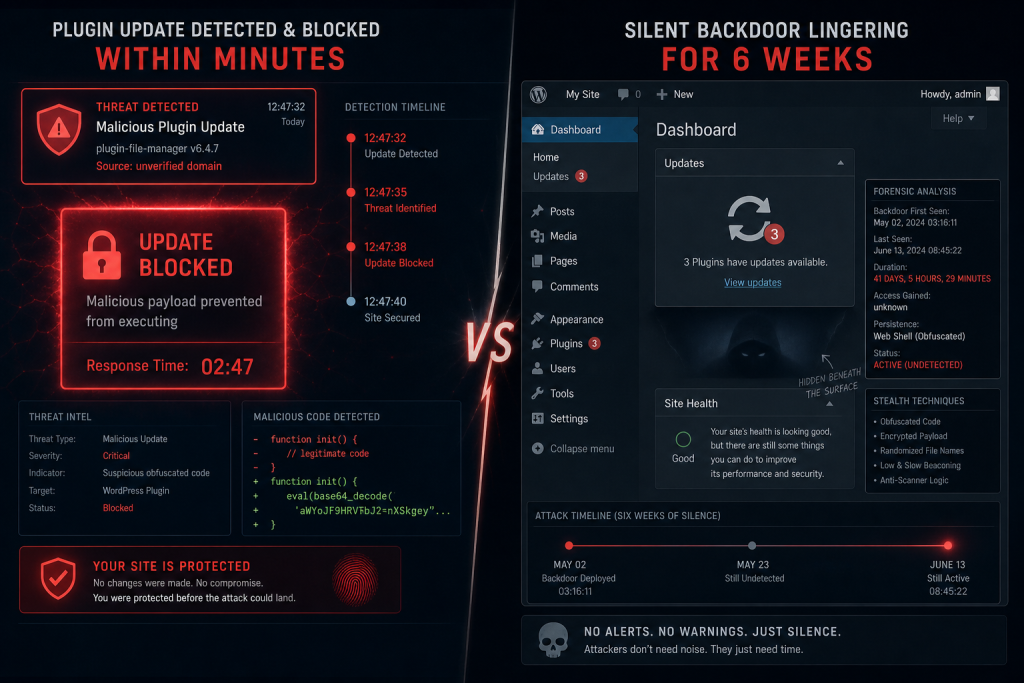
On July 28, 2026, Wordfence’s PRISM system detected a backdoored release of Advanced Responsive Video Embedder within two hours of publication. The plugin was rated critical (CVSS 9.8) with roughly 20,000 active installations. WordPress.org was notified at 15:43 UTC. By 16:09 UTC, the plugin was closed.
Fast forward one week. On August 7, 2026, Wordfence was notified of a very different kind of compromise: the BdThemes incident affecting Element Pack Addons for Elementor, Prime Slider, Pixel Gallery, Ultimate Post Kit, Ultimate Store Kit, Live Copy Paste, and Smart Admin Assistant. But here’s what made this one peculiar. The attackers never touched the plugin source code on WordPress.org. They never pushed a backdoored update. The plugins remained on their latest versions, completely unmodified, and still delivering attacker-controlled content to site administrators every single day.
The attack surface wasn’t the code. It was the data.
We have written before about backdoors shipped through auto-updates. This is the same problem wearing a different disguise: the trusted channel is the attack.
The Poisoned Feed Attack
All seven BdThemes plugins share an internal component called Biggopti that performs a simple function: it pulls down a static JSON promotional feed from a DigitalOcean Spaces bucket and renders it as banner advertisements inside the WordPress admin dashboard.
Attackers compromised that bucket and poisoned the feed with stored XSS payloads. Every time a logged-in administrator loaded wp-admin, the plugins fetched and rendered the malicious JSON. The browser executed the injected JavaScript, which created a rogue administrator account and dropped a PHP webshell into the site’s filesystem. Persistence was immediate. The attacker now had full control.
No version update would have saved you. The plugin sitting in your Plugins page showed green: active, latest version, clean source. Your version number told you nothing about what was about to run on the most privileged screen on your site.
The timeline is sobering. Based on timestamps in the poisoned records, the campaign may have started as early as June 23, 2026. It ran undetected for approximately six weeks before Wordfence identified it. The endpoints were cleaned on August 8. WordPress.org temporarily closed the affected plugins while the investigation continued.
Why We’re Still Playing Defense With Yesterday’s Tools
The security industry has gotten remarkably good at scanning plugin code. Wordfence proved it: PRISM caught Advanced Responsive Video Embedder’s backdoor in 120 minutes flat. Automated tools, static analysis, behavioral signatures. We have infrastructure. We have speed. We have precision.
We have nothing equivalent for the data plugins fetch at runtime.
A plugin can pull in promotional banners, news feeds, upsell widgets, license verification tokens, theme recommendations, or product catalogs from external endpoints. None of that data passes through WordPress.org review. None of it is signed or verified by the original author. None of it is scanned by your security tools. The plugin author may not even realize they’ve baked an unaudited channel into wp-admin, because the feature was built to solve a legitimate problem: show users announcements, recommend upgrades, or display time-sensitive offers without pushing a new version.
Attackers saw that same feature and recognized it for what it actually is: an RCE vector with no guards.
From Feed to Foothold
Let’s trace the BdThemes attack in concrete terms, because understanding the mechanics helps you understand why this will happen again.
- Plugin loads on admin page load. You’re logged in as administrator. You navigate to
wp-admin/. - Biggopti component runs. Behind the scenes, the plugin’s internal component makes an HTTP request to the DigitalOcean Spaces bucket:
https://[bucket].digitaloceanspaces.com/promo-feed.json. - Poisoned JSON arrives. The response contains an XSS payload disguised as promotional content. The JavaScript is executed in your browser, in the context of wp-admin, with your administrator session active.
- Account takeover. The payload calls WordPress’s REST API endpoints using your session cookies. It creates a new wp_users row with administrator role. It adds a backdoor account.
- Webshell deployed. The same payload writes a PHP file to
wp-content/uploads/or another writable directory. The attacker now has code execution on the server. - Persistence established. The attacker logs in as the backdoor account and plants additional persistence mechanisms: scheduled cron jobs, database hooks, theme modifications.
Total time to full compromise: the duration of a single wp-admin page load. You’ll never see a notification. There’s no error log entry. The plugin’s version number doesn’t change.
Why Version Numbers Are Only Half the Problem
The prevailing WordPress security advice has always been: keep your plugins updated. It’s correct advice, and it still matters. But it was built on the assumption that threats lived in the code. Updates patch vulnerabilities in the code. Version numbers prove you have the latest, patched version.
That model breaks when the threat lives in the data.
A plugin at version 3.2.1, the latest release, fully updated, with no known CVEs, can be actively compromising sites right now if the external feed it trusts has been poisoned. The version number tells you nothing. The update mechanism can’t help you. Your plugin security scanner, trained to detect malicious code patterns, won’t flag the feed because the malicious code hasn’t arrived yet. It arrives at runtime, dynamically injected from a third-party server you have no visibility into.
Every promotional banner, upsell widget, and news feed baked into a plugin is an unaudited channel into wp-admin. Treat it as untrusted by default. The plugin author may have the best intentions, but they have no control over the availability, integrity, or confidentiality of remote resources.
What Changes Now
We need a second layer of visibility. Code scanning will never go away (it caught ARVE in two hours), but it’s no longer sufficient. We need to watch what plugins are fetching at runtime. We need to know when a plugin’s ownership changes, when its infrastructure shifts, when its vendor relationship becomes unstable. We need to monitor the supply chain, not just the code.
That’s not something version numbers can tell you. It’s not something a weekly plugin update can defend against. It’s something that requires ongoing visibility into plugin behavior and plugin provenance.
We built PressBot’s Plugin Guardian to do exactly that. It watches plugin update verdicts in real time, tracks vendor ownership changes, and alerts you the moment a plugin’s control shifts hands or its update history shows signs of compromise. It’s the second layer your site needs now that data poisoning is a credible threat.
Start by enabling Plugin Guardian in PressBot Pro, then review your current plugin list. Pay special attention to any plugin that fetches remote content: promotional feeds, license checks, theme recommendations. Know who controls those endpoints. Know who controls the plugin. When either changes, you’ll know.